Find answers, guides, and support resources to help you get the most out of Crewmento's learning and training platform. Quickly resolve issues and explore step-by-step solutions.
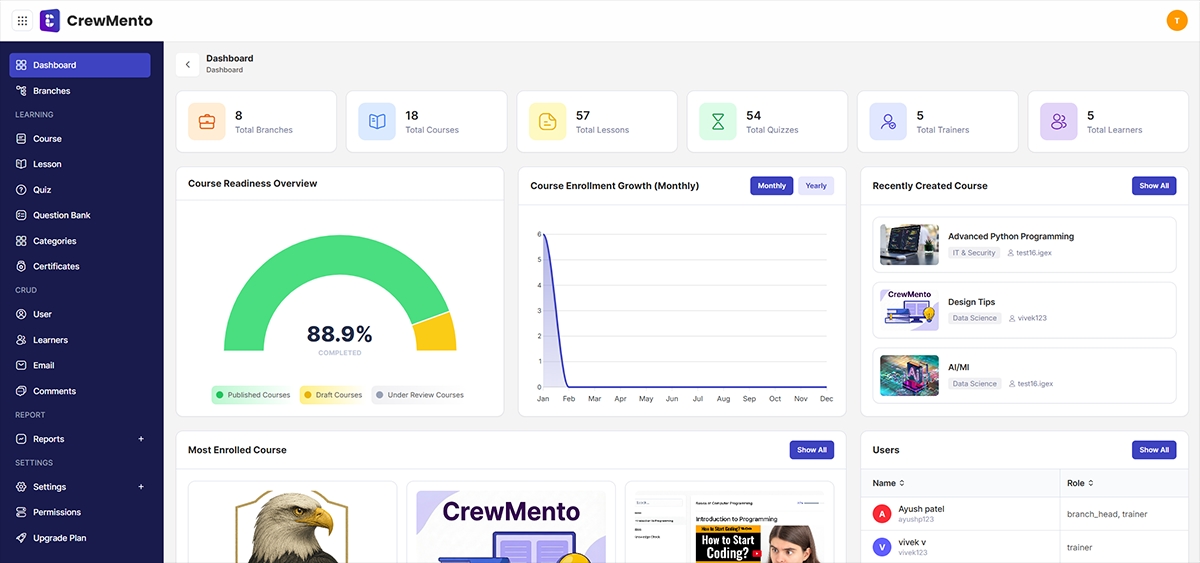
The Dashboard page is the main page of the Learning Management System. It shows a quick summary of important information such as the total number of courses, lessons, quizzes, enrolled courses, completed courses, and learners. These details are displayed in simple cards at the top of the page so users can understand the system status easily. The left-side menu helps users move to different sections like courses, lessons, quizzes, question bank, categories, certificates, users, and learners. Below the summary cards, the Most Enrolled Course section shows popular courses with their image, department, instructor name, and course title. The profile icon at the top right is used to view account details or log out. Overall, the dashboard helps users manage and track learning activities from one place in a simple and clear way.
Stop tracking compliance on paper. Let our team set up a personalized sandbox environment tailored to your specific facility, branch network, or call center.